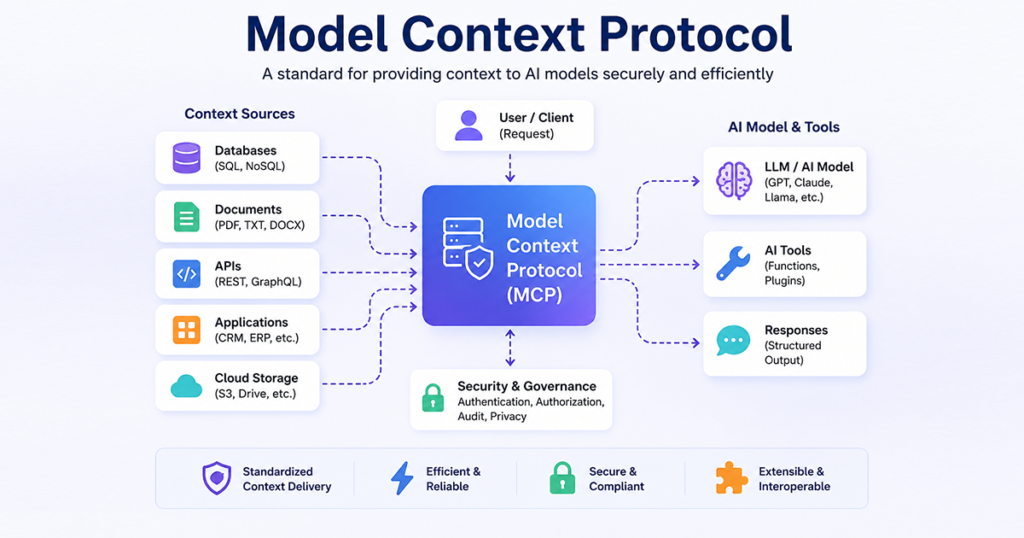
AI applications are becoming more capable, but an AI model by itself cannot automatically access your database, internal software, files, APIs, or business tools. This is where Model Context Protocol (MCP) becomes useful.
MCP provides a standardized way for AI applications to communicate with external tools and data sources. Python is one of the most convenient languages for building MCP servers because of its simple syntax, extensive ecosystem, and strong support for APIs, databases, automation, and AI development.
In this guide, we’ll understand how MCP works with Python, its architecture, how an MCP server operates, and how it can be used in real-world applications.
What Is MCP?
MCP stands for Model Context Protocol. It is an open protocol designed to help AI applications connect with external systems in a consistent way.
Instead of creating a completely different integration for every AI application and data source, MCP provides a common communication layer. For example, an AI assistant could use MCP to interact with:
- Databases
- REST APIs
- Business applications
- Local files
- Development tools
- CRM systems
- Project management applications
- Custom Python functions
A simple way to understand MCP is:
User → AI Application → MCP Client → MCP Server → Database / API / Files / Business Tools
The AI determines what information or action it needs, while the MCP server provides controlled access to the appropriate external capability.
Why Use Python with MCP?
Python is widely used for AI development, automation, APIs, data processing, and backend applications. This makes it a natural choice for creating MCP servers.
With Python, an MCP server can connect an AI application to systems such as MySQL, PostgreSQL, REST APIs, internal software, cloud services, or custom business logic.
Python is particularly useful because developers can turn existing Python functions into tools that an MCP-compatible application can use. For example:
def get_customer(customer_id):
    return database.get_customer(customer_id)
Instead of the AI directly accessing the database, the MCP server can expose a controlled tool such as get_customer(customer_id). This separation can make integrations easier to organize, secure, and maintain.
How MCP Works with Python
The basic MCP workflow contains several components.
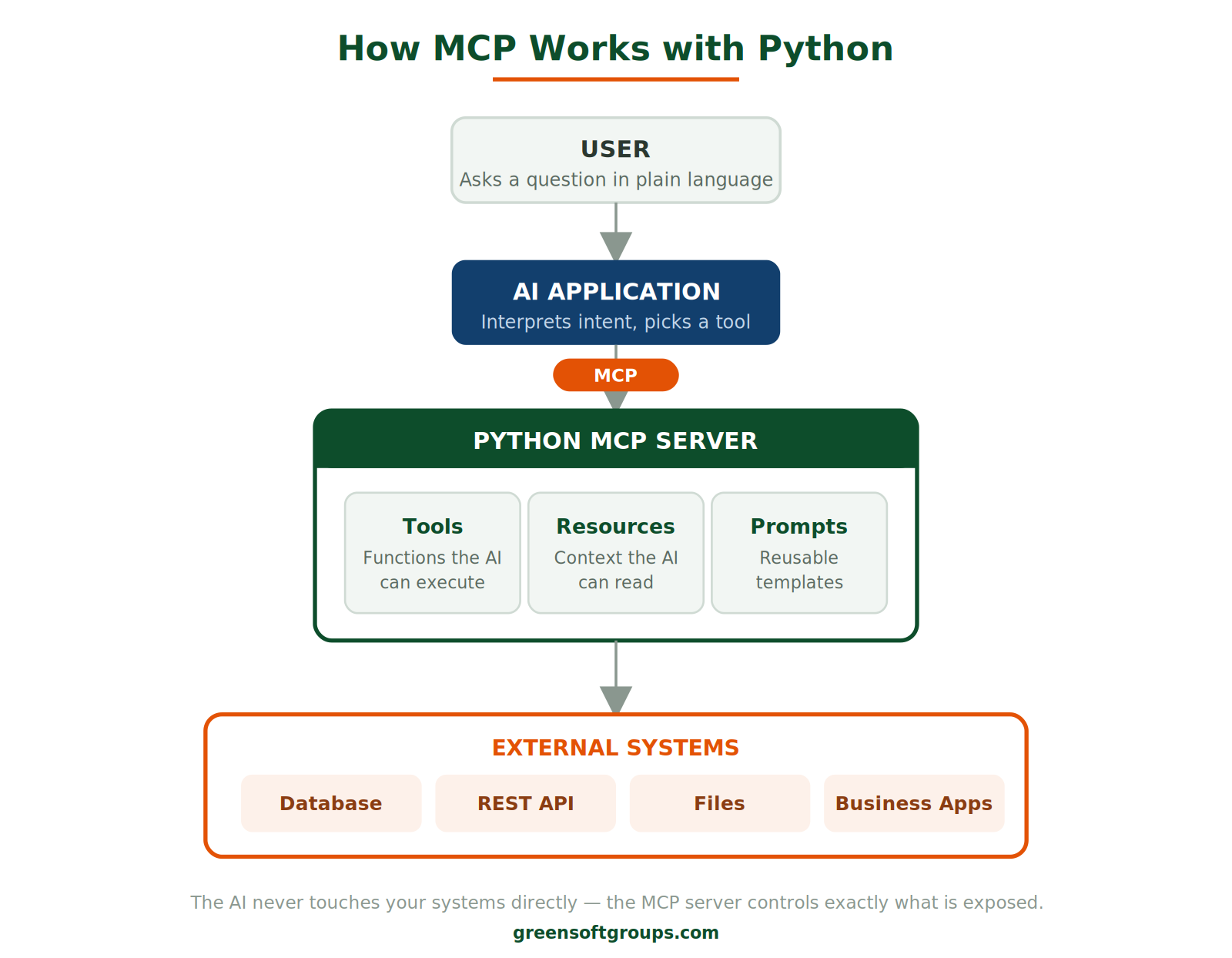
The process generally happens in five steps.
Step 1: The user sends a request
For example, a user might ask, “Show me all projects that are overdue.”
Step 2: The AI interprets the request
The AI understands that it needs project information that is not available directly in its current context.
Step 3: The appropriate MCP tool is selected
The MCP server may expose a tool such as get_overdue_projects().
Step 4: Python executes the required operation
The Python MCP server can query a database, call an API, read a file, or run other application logic.
Step 5: The result returns to the AI
The AI receives structured information and turns it into a useful natural-language response.
Creating a Simple MCP Server with Python
A simplified Python MCP server can look like this:
from mcp.server.fastmcp import FastMCP

mcp = FastMCP("Demo Server")

@mcp.tool()
def add_numbers(a: int, b: int) -> int:
    """Add two numbers."""
    return a + b

@mcp.tool()
def get_customer(customer_id: int):
    """Return customer information."""
    return {
        "id": customer_id,
        "name": "Arun",
        "status": "Active"
    }

if __name__ == "__main__":
    mcp.run()
In this example, the MCP server provides two tools:
add_numbers()get_customer()
An MCP-compatible AI application can discover the available tools and use an appropriate one when necessary.
MCP Tools, Resources, and Prompts
MCP is more than simply executing Python functions. Three concepts are particularly important.
Tools
Tools allow the AI application to perform actions. Examples might include:
create_customer()
search_projects()
generate_invoice()
update_project()
send_notification()
Resources
Resources provide contextual information that an application can read. Depending on the implementation, resources could represent documents, application data, configuration information, or other structured content.
Prompts
Prompts can provide reusable prompt templates or workflows that an MCP client can expose to users or applications.
Together, these capabilities allow developers to build richer AI integrations.
Connecting MCP with a Database
One of the most useful Python MCP applications is database integration. A typical architecture looks like this:
AI Assistant → MCP Client → Python MCP Server → MySQL Database
Suppose your database contains tables for clients, projects, tasks, invoices, and payments. Your MCP server could provide tools such as:
@mcp.tool()
def get_pending_invoices():
    # Query database
    # Return pending invoices
    pass
The user could then ask, “Which clients have pending invoices?” The AI application could use the relevant MCP tool, receive the database results, and explain them to the user.
MCP with Python and Laravel
MCP can also complement an existing Laravel application. You don’t necessarily need to replace PHP or Laravel with Python. A possible architecture is:
AI Assistant → MCP Client → Python MCP Server → Laravel API → MySQL Database
For example, your Laravel application could provide:
GET  /api/projects
GET  /api/clients
GET  /api/invoices/pending
POST /api/projects
The Python MCP server could communicate with those APIs and expose suitable tools to the AI application. The result is an architecture where Laravel continues handling your core web application while MCP provides an AI-friendly integration layer.
MCP vs REST API
MCP and REST APIs are related technologies, but they serve different purposes.
| REST API | MCP |
|---|---|
| Provides application endpoints | Provides a standardized AI integration interface |
| Commonly uses HTTP requests | Supports MCP-defined communication and capabilities |
| Developers explicitly program API calls | MCP clients can discover available capabilities |
| Excellent for application-to-application communication | Designed around connecting AI applications to external context and tools |
Importantly, MCP does not necessarily replace REST APIs. They can work together:
AI → MCP → Python MCP Server → REST API → Business Application → Database
Real-World Example: Freelancer Management Platform
Consider a Freelancer Project & Client Management Platform containing clients, projects, tasks, invoices, and payments. A Python MCP server could expose tools such as:
get_clients()
get_projects()
get_project_status()
get_pending_tasks()
get_pending_invoices()
get_overdue_payments()
create_project()
update_project_status()
Now imagine the manager asks:
“Give me a summary of all overdue projects and pending payments.”
Instead of manually opening several screens, the AI application could use the relevant MCP tools to retrieve the required data and prepare a summary.
This is where MCP becomes particularly valuable: it creates a structured bridge between natural-language AI interactions and existing business systems.
Benefits of Using MCP with Python
Using Python with MCP can provide several advantages:
- Easy AI integration: Connect AI applications with existing systems through standardized MCP capabilities.
- Reusable tools: A well-designed MCP server can expose tools that multiple compatible clients can understand.
- Database connectivity: Python has mature libraries for MySQL, PostgreSQL, SQLite, MongoDB, and other databases.
- API integration: Existing REST APIs can be wrapped or accessed through MCP tools.
- Automation: Python can handle reporting, data processing, notifications, file operations, and business workflows.
- Controlled access: Developers determine exactly which tools and resources are exposed rather than giving an AI unrestricted system access.
Where Can MCP with Python Be Used?
MCP can be useful across many types of applications, including customer support assistants, CRM systems, project management software, ERP platforms, reporting dashboards, developer tools, document-management systems, internal knowledge assistants, and workflow automation.
For example, an organization could ask an AI assistant “Show this month’s pending invoices” or “Summarize projects that are behind schedule.” The MCP integration can retrieve the required information from the organization’s systems, while the AI handles understanding and presenting the result.
Is MCP the Future of AI Integration?
As AI applications become more connected to business software, databases, APIs, and internal tools, standardized integration methods become increasingly important.
MCP provides one approach for creating these connections without designing a completely different AI-specific integration for every system. Python strengthens this approach because it already has a large ecosystem for AI, automation, backend development, APIs, and databases.
Rather than thinking of MCP as replacing Python, Laravel, REST APIs, or databases, it is better understood as another integration layer connecting AI applications with those technologies.
Conclusion
MCP provides a standardized method for connecting AI applications with external tools, resources, and data. Python makes it relatively straightforward to build MCP servers that interact with APIs, databases, files, and business applications.
The basic concept is simple:
AI Application → MCP → Python MCP Server → Database / API / Tools
For developers already working with Python, Laravel, MySQL, or APIs, learning MCP can be a useful next step toward building AI-enabled business applications and intelligent automation systems.
Need AI integration for your business systems?
Greensoft Groups builds Python, Laravel and AI-enabled business applications for startups and growing companies.
 Follow us on LinkedIn