

RAG with Python: A Complete Step-by-Step Guide
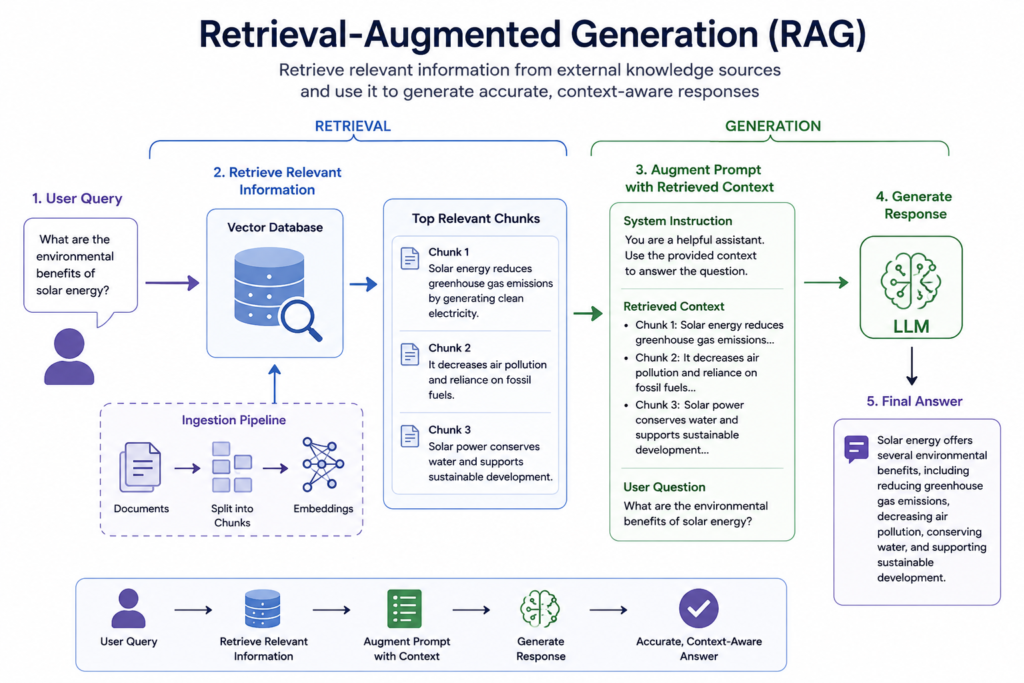
Retrieval-Augmented Generation (RAG) is a technique that connects a large language model (LLM) to an external knowledge source, so it can retrieve relevant information before generating an answer. This solves the two biggest limitations of standalone LLMs: outdated knowledge and hallucination. In Python, RAG is typically built using an embedding model, a vector database, and an LLM, orchestrated with a framework like LangChain or LlamaIndex.
This guide walks through what RAG is, how it works, and how to build a working RAG pipeline in Python from scratch.
What Is RAG?
RAG stands for Retrieval-Augmented Generation. It is an AI architecture that combines two steps:
- Retrieval — searching a knowledge base (documents, PDFs, database records, websites) for the most relevant pieces of information related to a user's question.
- Generation — feeding that retrieved information to an LLM as context, so it can generate an accurate, grounded answer.
Instead of relying only on what the model learned during training, RAG lets the model "look up" facts in real time — similar to how a person might search a document before answering a question, rather than answering purely from memory.
Why Use Python for RAG?
Python is the standard language for RAG because of its mature AI ecosystem:
- LangChain and LlamaIndex — high-level frameworks that handle chunking, retrieval, and orchestration
- FAISS, Chroma, Pinecone, Weaviate, Qdrant — vector databases with Python SDKs
- sentence-transformers, OpenAI, and Anthropic — embedding and generation models with simple Python APIs
- Wide community support, tutorials, and production-ready tooling
How RAG Works: The Architecture
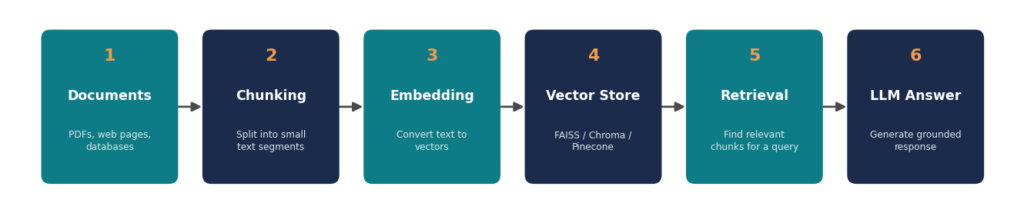
A typical RAG pipeline has five stages:
| Stage | What Happens |
|---|---|
| 1. Ingestion | Documents are loaded and split into smaller chunks |
| 2. Embedding | Each chunk is converted into a numerical vector |
| 3. Storage | Vectors are stored in a vector database for fast similarity search |
| 4. Retrieval | The user's query is embedded and matched against stored vectors |
| 5. Generation | The top-matching chunks are passed to the LLM along with the query to generate a final answer |
Prerequisites
Before starting, install the core libraries:
pip install langchain langchain-community langchain-openai faiss-cpu tiktoken pypdfYou'll also need an API key from an LLM provider (OpenAI, Anthropic, etc.), stored as an environment variable:
export OPENAI_API_KEY="your-api-key-here"Step-by-Step: Building a RAG Pipeline in Python
Step 1: Load Your Documents
from langchain_community.document_loaders import PyPDFLoader
loader = PyPDFLoader("company_handbook.pdf")
documents = loader.load()
LangChain supports loaders for PDFs, Word docs, CSVs, websites, Notion, and more — swap PyPDFLoader for the loader that matches your source.
Step 2: Split Documents into Chunks
LLMs and embedding models work best on small, focused chunks rather than entire documents.
from langchain.text_splitter import RecursiveCharacterTextSplitter
splitter = RecursiveCharacterTextSplitter(
    chunk_size=1000,
    chunk_overlap=200
)
chunks = splitter.split_documents(documents)
chunk_overlap preserves context across chunk boundaries so no information gets cut off mid-sentence.
Step 3: Generate Embeddings
Embeddings turn text into vectors that capture semantic meaning.
from langchain_openai import OpenAIEmbeddings

embeddings = OpenAIEmbeddings(model="text-embedding-3-small")
Step 4: Store Vectors in a Vector Database
FAISS is a fast, free, local option good for prototyping. For production, consider Chroma, Pinecone, or Qdrant.
from langchain_community.vectorstores import FAISS

vector_store = FAISS.from_documents(chunks, embeddings)
vector_store.save_local("faiss_index")
Step 5: Retrieve Relevant Chunks
retriever = vector_store.as_retriever(search_kwargs={"k": 4})
relevant_docs = retriever.invoke("What is the company's remote work policy?")
This returns the four most semantically similar chunks to the query.
Step 6: Generate the Final Answer
from langchain_openai import ChatOpenAI
from langchain.chains import RetrievalQA

llm = ChatOpenAI(model="gpt-4o-mini", temperature=0)

qa_chain = RetrievalQA.from_chain_type(
    llm=llm,
    retriever=retriever,
    return_source_documents=True
)

response = qa_chain.invoke({"query": "What is the company's remote work policy?"})
print(response["result"])
Full Minimal RAG Pipeline
from langchain_community.document_loaders import PyPDFLoader
from langchain.text_splitter import RecursiveCharacterTextSplitter
from langchain_openai import OpenAIEmbeddings, ChatOpenAI
from langchain_community.vectorstores import FAISS
from langchain.chains import RetrievalQA

# 1. Load
documents = PyPDFLoader("company_handbook.pdf").load()

# 2. Split
chunks = RecursiveCharacterTextSplitter(
    chunk_size=1000, chunk_overlap=200
).split_documents(documents)

# 3. Embed + Store
vector_store = FAISS.from_documents(chunks, OpenAIEmbeddings())

# 4. Retrieve + Generate
qa_chain = RetrievalQA.from_chain_type(
    llm=ChatOpenAI(model="gpt-4o-mini", temperature=0),
    retriever=vector_store.as_retriever(search_kwargs={"k": 4})
)

answer = qa_chain.invoke({"query": "What is the company's remote work policy?"})
print(answer["result"])
Popular RAG Frameworks in Python
| Framework | Best For |
|---|---|
| LangChain | General-purpose RAG pipelines, largest ecosystem |
| LlamaIndex | Document-heavy use cases, advanced indexing strategies |
| Haystack | Production search + RAG pipelines with strong evaluation tools |
| Custom (no framework) | Full control, minimal dependencies, simpler debugging |
RAG vs. Fine-Tuning
RAG and fine-tuning solve different problems. RAG adds fresh, external knowledge at query time without touching the model itself, while fine-tuning changes the model's internal weights through additional training.
Best Practices for Production RAG
- Tune chunk size — too small loses context, too large dilutes relevance. 500–1000 characters is a common starting point.
- Use metadata filtering — tag chunks with source, date, or category to narrow retrieval.
- Evaluate retrieval quality separately from generation quality — a wrong answer is often a retrieval problem, not a model problem.
- Add a re-ranker — a lightweight model that re-scores retrieved chunks improves relevance beyond raw vector similarity.
- Cache embeddings — avoid re-embedding unchanged documents on every run.
- Monitor for hallucination — even with RAG, instruct the LLM to answer only from provided context and say "I don't know" when it isn't there.
Frequently Asked Questions
What is the difference between RAG and fine-tuning?
Fine-tuning changes a model's internal weights using training data, which is expensive and static. RAG keeps the model unchanged and instead supplies fresh, relevant information at query time, making it cheaper to update and easier to keep current.
Do I need a GPU to build a RAG system in Python?
No. If you use API-based embeddings and LLMs (OpenAI, Anthropic), all the heavy computation happens on the provider's servers. A GPU is only needed if you're running open-source embedding or generation models locally.
Which vector database should I use for RAG?
FAISS is a good starting point for local prototyping since it's free and requires no server. For production apps with multiple users, managed options like Pinecone, Qdrant, or Weaviate offer better scalability and persistence.
Can RAG work with data other than PDFs?
Yes. RAG works with any text source — websites, Word documents, CSVs, databases, Notion pages, Slack messages, and more — as long as it can be loaded and converted into text chunks.
Conclusion
RAG is one of the most practical ways to make LLMs useful for real-world, domain-specific applications without the cost of fine-tuning. With Python and libraries like LangChain, FAISS, and OpenAI's embedding models, a working RAG pipeline can be built in under 50 lines of code — and scaled into a production system from there.
Need AI integration for your business systems?
Greensoft Groups builds Python, Laravel and AI-enabled business applications for startups and growing companies.
 Follow us on LinkedIn